Distributed Caching
1. Executive Summary
Distributed caching places a shared, horizontally scaled cache tier (typically in-memory) between application instances and the authoritative data store. Unlike per-process local caches, a distributed cache provides consistent key namespace, shared state across instances, and horizontal capacity—at the cost of network latency, operational complexity, hot-key bottlenecks, and failure modes distinct from single-node Redis.
Architectural decisions include cluster topology (standalone, sentinel, cluster mode), sharding strategy (hash slot, consistent hashing), replication for availability, client routing (smart client vs proxy), data structures beyond strings (hashes, sorted sets), and multi-region deployment for latency vs consistency tradeoffs.
This chapter covers Redis Cluster architecture, hot-key mitigation, near-cache patterns, coherence between local and remote tiers, security, failover, cost at scale, and principal-level sizing for high-traffic systems.
2. Why This Topic Matters
System design interviews ask: "Scale Redis for 1M RPS" or "Handle viral post with 100k reads/sec." Weak answers add more Redis memory.
Strong candidates explain:
- Single Redis thread per key limits hot-key throughput.
- Cluster mode shards by hash slot—16384 slots in Redis Cluster.
- Local near-cache + Redis reduces network hops for hottest keys.
- Replica reads trade consistency for scale—stale reads possible.
- Cache aside still requires app-level invalidation across regions.
Production failures include CLUSTERDOWN, hot key melting one shard, big key blocking single thread, failover causing brief unavailability, and cross-AZ latency dominating p99. Distributed cache is a distributed system—apply CAP reasoning.
3. Problems Being Solved
| Problem | Single Redis | Distributed cache |
|---|---|---|
| Memory ceiling | One machine RAM | Shard across nodes |
| Throughput | Single-thread bottleneck | Parallel shards |
| Availability | SPOF | Replication + failover |
| Geographic latency | Remote users hit one region | Multi-region replicas |
| Session stickiness | All instances need shared store | Central session cache |
Distributed caching solves shared low-latency state at scale. It does not replace database durability (unless using Redis persistence by design—a distinct architecture), automatic cache coherence with local tiers, or unlimited hot-key scale without application techniques.
4. Assumptions and System Model
Assume Redis Cluster or equivalent sharded in-memory store unless noted:
- Keys map to hash slots via
CRC16(key) mod 16384(Redis Cluster). - Single-key commands atomic per slot; multi-key ops require same slot or hash tags
{user}:profile,{user}:cart. - Failures: Node crash, network partition, slow commands, failover promotion.
- Consistency: Primary-replica async replication by default—stale reads on replicas possible.
- Not Byzantine unless discussing encrypted channels.
CAP positioning: During partition, Redis Cluster generally favors availability of reachable slots with possible stale replica reads—not linearizable distributed cache by default.
5. Essential Terminology
| Term | Definition |
|---|---|
| Shard | Subset of keyspace on one primary node. |
| Hash slot | Redis Cluster unit of 16384 slots mapping keys to nodes. |
| Hash tag | {tag} in key forces same slot for related keys. |
| Hot key | Key receiving disproportionate traffic. |
| Big key | Large value or collection blocking operations. |
| Near-cache | Local L1 in front of remote L2 distributed cache. |
| Read replica | Follower serving reads; may lag primary. |
| Sentinel | HA monitoring and failover for non-cluster Redis. |
| Cluster bus | Gossip protocol between Redis Cluster nodes. |
| MOVED / ASK | Redirect responses during slot migration or failover. |
Mnemonic: Shard spreads keys; hot keys break shards.
6. Core Mechanism
Redis Cluster topology
Figure 1: Each primary owns hash slot range; replica promotes on primary failure.
Hot key mitigation with local replicas
Figure 2: Local near-cache absorbs hot key reads; optional in-memory replicas on app tier for extreme cases.
Multi-region read path
Figure 3: Cross-region caching reduces latency; replication lag defines staleness across regions.
7. Step-by-Step Walkthrough
Scenario: Social feed service—500k RPS read, 10k unique keys/sec, one viral post key post:viral at 200k RPS.
| Step | Analysis | Action |
|---|---|---|
| 1 | Baseline cluster 6 nodes | Even key distribution |
| 2 | Monitor per-key QPS | Detect post:viral hot shard |
| 3 | Enable local Caffeine near-cache 1s TTL | Absorb 80% on each instance |
| 4 | Application read random replica of hot key | Client-side fan-out—pattern; verify Redis license/version |
| 5 | Split key logically | post:viral:comments separate if needed |
| 6 | Rate limit origin on miss | Protect DB |
Sharding new cluster:
| Step | Action |
|---|---|
| 1 | Estimate working set memory + 30% headroom |
| 2 | Choose node count: total_memory / per_node_ram |
| 3 | Enable cluster mode; 1 primary + 1 replica per shard minimum |
| 4 | Use hash tags for multi-key transactions {userId}:session, {userId}:cart |
| 5 | Load test with Zipf key distribution—not uniform |
Failover sequence:
| Event | Behavior |
|---|---|
| Primary dies | Replica promoted; brief write unavailability for slot |
| Split brain (misconfig) | Data divergence—use cluster quorum properly |
| Node rejoins | Resync from primary |
Consistent hashing (Memcached client model):
Unlike Redis Cluster's fixed slot model, Memcached clients typically use consistent hashing with virtual nodes:
| Concept | Purpose |
|---|---|
| Hash ring | Keys map to positions on ring |
| Virtual nodes | Each physical server has many virtual points—better balance |
| Server add/remove | Only K/n keys remap (K keys, n servers) |
When a Memcached node fails, clients redistribute only its key range—other nodes unaffected. Compare to Redis Cluster's explicit slot migration with MOVED redirects.
Redis persistence modes (when cache is rebuildable vs not):
| Mode | Durability | Recovery | Use when |
|---|---|---|---|
| No persistence | None | Cold rebuild from DB | Pure cache-aside |
| RDB snapshots | Point-in-time | Faster restart | Large dataset rebuild expensive |
| AOF append | Finer granularity | Replay log | Session store; tolerate slower writes |
| AOF + fsync always | Strongest Redis durability | Slowest writes | Rare; consider real DB instead |
Architects treating Redis as authoritative session store must enable persistence and replication—different SLA than ephemeral product cache.
Client-side routing patterns:
| Pattern | Description |
|---|---|
| Smart client | Client caches slot map; follows MOVED/ASK |
| Proxy (Twemproxy, Envoy) | Central routing; simpler clients |
| Sidecar | Per-pod proxy in service mesh |
Proxy adds hop latency but simplifies client libraries in polyglot environments.
Memory fragmentation and latency:
Long-running Redis instances may suffer memory fragmentation—used_memory vs used_memory_rss divergence. Redis 4+ offers activedefrag (verify version). Symptoms: elevated latency despite low command rate, OOM despite apparent free memory. Operational response: schedule rolling restart during low traffic, or enable active defragmentation with monitoring.
Multi-tenant cache isolation:
Shared Redis clusters for multiple services require:
| Control | Purpose |
|---|---|
| Key prefix per service | billing:, catalog: |
| ACL per application user | Least privilege commands |
| Memory limits per tenant (Redis 7+ memory quotas—verify) | Noisy neighbor prevention |
| Separate clusters for PCI vs non-PCI | Compliance boundary |
Never share cache clusters between production and staging—staging FLUSHDB incidents on shared clusters are a recurring postmortem theme in industry blogs.
Redis Cluster resharding operations:
Adding capacity requires slot migration between nodes:
| Phase | Client behavior |
|---|---|
| Migration planned | Normal operation |
| Keys migrating | ASK redirects to importing node |
| Migration complete | MOVED responses update slot map |
Plan resharding during low-traffic windows; clients must handle redirects without retry storms (exponential backoff on CLUSTERDOWN).
Comparison: Redis Cluster vs Redis Sentinel:
| Feature | Sentinel (non-cluster) | Cluster |
|---|---|---|
| Sharding | Single primary (or manual sharding) | Automatic hash slots |
| Failover | Sentinel promotes replica | Automatic per-shard |
| Multi-key ops | All keys on one node | Same-slot only |
| Max memory | One node RAM | Sum of all primaries |
| Complexity | Lower | Higher |
Use Sentinel for datasets fitting one node; Cluster when horizontal memory or throughput requires sharding.
Latency budget example (same-AZ):
| Hop | Typical latency |
|---|---|
| App → local cache hit | < 1 μs |
| App → Redis (same AZ) | 0.2–1 ms |
| App → Redis (cross-region) | 50–150+ ms |
| App → DB | 1–10 ms |
Cross-region Redis for latency-sensitive paths often fails the latency budget—use regional clusters with async replication and accept staleness, or local cache with short TTL.
Elasticache Global Datastore note:
AWS Global Datastore provides cross-region replication for Redis with sub-second replication lag in ideal conditions—verify current AWS documentation for consistency guarantees. Reads from secondary regions may still lag; not a substitute for understanding your staleness SLA. Primary region failure triggers promoted secondary—test failover runbooks quarterly.
Connection storm on application scale-out:
Deploying 500 new pods each opening 50 Redis connections = 25,000 connections—may exceed maxclients. Mitigate with:
- Connection pooling (one pool per pod, bounded size).
- Redis proxy layer consolidating connections.
- Monitor
connected_clientswith autoscaling alerts.
Disaster recovery for distributed cache:
| Scenario | RPO | RTO strategy |
|---|---|---|
| Single node failure | 0 (replica promote) | Seconds–minutes automatic |
| Full cluster loss | Depends on persistence | Rebuild from origin; hours |
| Region failure | Async replication lag | Failover to DR region; accept data loss window |
Caches without persistence treat DR as cold rebuild—ensure origin can absorb full read load during recovery; circuit breakers prevent cascade failure.
8. Invariants and Guarantees
| Property | Type | Statement |
|---|---|---|
| Single-key atomicity | Safety | Per command on one slot |
| Multi-key atomicity | Conditional | Same hash slot or hash tag only |
| Durability | Config-dependent | AOF/RDB optional—not default cache semantics |
| Linearizable reads | Not default | Use primary reads; sync replication rare |
| Slot coverage | Safety | All 16384 slots assigned in healthy cluster |
9. Failure Scenarios
Scenario 1: Hot key on single shard
Setup: Celebrity post; all traffic to one slot.
Effect: CPU 100% on one primary; elevated latency cluster-wide if misrouted.
Mitigation: Near-cache; read replicas; application-layer key splitting; CDN for public content.
Scenario 2: Big key deletion
Setup: 50MB hash key deleted synchronously.
Effect: Blocks Redis thread—latency spike all keys on node.
Mitigation: UNLINK async delete; avoid big keys; scan in chunks.
Scenario 3: Cache avalanche after cluster restart
Setup: Cold cluster; traffic flood.
Effect: DB overload.
Mitigation: Warmup; staggered restart; circuit breaker.
Scenario 4: Stale read from replica
Setup: Write to primary; immediate read from replica before sync.
Effect: User sees old session state.
Mitigation: Read from primary for session consistency; or wait WAIT command (latency cost).
Scenario 5: Slot migration during resharding
Setup: Adding nodes; keys moving slots.
Effect: ASK/MOVED redirects; latency bump.
Mitigation: Reschedule during low traffic; monitor migration progress.
Scenario 6: Cross-slot multi-key transaction failure
Setup: MGET user:1 cart:2 without hash tags—different slots.
Effect: CROSSSLOT error.
Mitigation: Hash tag design {user1}:profile, {user1}:cart.
10. Performance Characteristics
| Factor | Impact |
|---|---|
| Network RTT | 0.1–2ms same AZ; cross-region higher |
| Serialization | JSON vs protobuf CPU |
| Pipeline / batching | Amortize RTT |
| Connection count | Pool per app instance |
| TLS | CPU overhead on client and server |
Throughput: Single Redis primary often cited ~100k–300k ops/sec for simple GET—benchmark your workload; do not treat as universal.
11. Scalability Limits
- Hot keys don't shard further without application help.
- 16384 slots max theoretical shards—practical cluster sizes tens of nodes.
- Memory linear with dataset—no compression by default for strings.
- Cross-slot operations limited—design keys accordingly.
- Pub/sub not cluster-wide same as single node—understand scale limits.
12. Operational Considerations
- Monitor: memory max, evictions, connected clients, commands/sec per node, hot keys (Redis 7+ hot key sampling features—verify version).
- Slowlog analysis; block
KEYS *in production. - Rolling upgrades with cluster compatibility.
- Backup: RDB snapshots if cache rebuild expensive—not if purely derived.
- ACLs per microservice principle.
13. Security Considerations
- VPC private endpoints; no public Redis.
- AUTH / ACL tokens rotated.
- TLS in transit mandatory in regulated environments.
- Encryption at rest for ElastiCache—platform feature.
- Dangerous commands renamed/disabled (
FLUSHALL,CONFIG).
14. Cost Considerations
- Memory-optimized instances expensive—right-size working set.
- Cross-AZ traffic charges in cloud.
- Over-provisioned replicas double memory cost.
- Managed service premium vs self-hosted ops labor.
- Cold cache miss still hits DB—model total cost of ownership.
15. Production Implementations
Redis Cluster (self-managed / ElastiCache cluster mode)
Industry default for distributed cache—hash slots, auto-failover.
Memcached
Multithreaded; client-side consistent hashing; no persistence—simple cache pool.
Hazelcast / Apache Ignite
In-memory data grid with partition tolerance—JVM ecosystem.
Amazon ElastiCache
Redis and Memcached managed; Global Datastore cross-region—verify consistency model in docs.
Twitter / Pelikan
Internal caching infrastructure separating different SLAs—anecdotal large-scale separation of cache types.
Cloudflare Workers KV / Durable Objects
Edge-distributed key-value with different consistency—not Redis but distributed cache class at edge.
16. Alternatives and Tradeoffs
| System | Strength | Limitation |
|---|---|---|
| Redis Cluster | Rich data structures; persistence option | Hot key shard limits |
| Memcached | Simple multithreaded | No persistence; simpler API |
| Local-only cache | Fastest | No cross-instance sharing |
| CDN edge KV | Geographic | Limited mutation/consistency |
| DB read replicas | Stronger consistency option | Higher latency than RAM |
17. Common Misconceptions
| Misconception | Reality |
|---|---|
| "Cluster = infinite scale" | Hot keys still bottleneck one shard. |
| "Replicas for read scale always safe" | Replication lag causes stale reads. |
| "Redis is a database" | Persistence optional; different durability model. |
| "More nodes = more memory linearly" | Replication factor reduces net capacity. |
| "Hash tags optional" | Required for multi-key atomicity. |
18. Principal Architect Perspective
- Load test with Zipf key distribution—uniform tests lie.
- Plan hot key playbook before launch events.
- Near-cache almost always for read-heavy L2 architectures.
- Hash tag key design in schema review—not retrofit.
- Treat failover as routine—clients must handle redirects and timeouts.
Multi-region: Prefer active-passive cache with async replication unless business accepts stale cross-region reads; session data may need sticky routing to primary region.
19. Architecture Review Exercise
Scenario: 6-node Redis Cluster, all reads/writes to primaries, no local cache, uniform load test passed, production hot influencer event planned.
Review prompts:
- Will production match load test?
- Hot key plan?
- Memory eviction policy under spike?
- Client timeout and retry storm risk?
Expected findings: Add near-cache; hot key monitoring; volatile-lru policy documented; circuit breakers; replica read strategy with staleness acceptance.
20. Whiteboard Explanation
90-second version:
"Distributed cache shares memory across app servers—usually Redis Cluster sharding keys into 16384 hash slots across primaries with replicas for HA. Clients route via slot map; failover promotes replica. Scale is limited by hot keys—a viral key hits one shard's single thread. Mitigate with local near-cache on each app instance, read fan-out patterns, or splitting the key. Use hash tags like {userId}:cart and {userId}:profile for multi-key ops on same slot. Replicas scale reads but may be stale—session consistency may need primary reads. Network RTT matters—co-locate cache in same AZ as apps. It's a distributed system: plan for node failure, slot migration, and cold start. Memcached alternative if you need simpler multithreaded pure cache without persistence."
21. Interview Questions
-
How Redis Cluster shards?
- Signals: Hash slots CRC16; 16384 slots.
-
Hot key mitigation?
- Signals: Near-cache, replicas, split key, CDN.
-
Hash tag purpose?
- Signals: Same slot for related keys.
-
Replica read tradeoff?
- Signals: Stale data; lag.
-
Redis vs Memcached?
- Signals: Structures, persistence, threading model.
-
CROSSSLOT error?
- Signals: Multi-key different slots.
-
Design session store on Redis Cluster.
- Signals: Hash tag per user, TTL, primary read on write path.
-
Cluster failover impact?
- Signals: Brief unavailability; client redirects.
-
Size cluster for 500GB working set?
- Signals: Memory per node, replication factor, headroom.
-
Near-cache coherence?
- Signals: TTL + pub/sub invalidation.
Scoring rubric:
| Dimension | Strong | Weak |
|---|---|---|
| Sharding | Slots, hash tags | "Add nodes" |
| Hot keys | Specific mitigations | Ignores |
| Consistency | Replica lag | "Always fresh" |
22. Interview Follow-Ups
-
Redis node OOM?
- Signals: Eviction policy, maxmemory, alert, shard data.
-
Global session cache?
- Signals: Sticky region, async replication, JWT alternative.
-
When Memcached over Redis?
- Signals: Simple GET/SET at extreme multithreaded QPS.
22A. Production Low-Level Design (Interview + Game Day)
Redis Cluster (L2) + L1 near-cache with consistent-hash routing and hot-key playbook. Production LLD and Game Day Standard.
Control vs data plane
| Plane | Components |
|---|---|
| Control | Slot map / ring config, hot-key detector, resharding runbook |
| Data | 16384 hash slots → primaries + replicas; app L1 LRU; cache-aside to DB |
Step-by-step flow:
| Step | Action | Hot-key note |
|---|---|---|
| 1 | L1 GET — absorb viral reads locally | Sharding does not fix one hot key |
| 2 | Cluster client resolves slot → primary | MOVED/ASK on migration |
| 3 | Primary serves or miss → DB via singleflight | Per-key single-thread limit |
| 4 | Async replicate to replica | Stale replica reads OK for feeds |
| 5 | Cold miss loads DB; SET L2 + L1 | Zipf load test, not uniform |
Contract
| Field | Value |
|---|---|
| Working set | 100GB + 40% headroom; RF ≥ 1 replica/AZ |
| Key design | post:{id}; {userId}:session hash tags for multi-key |
| DR | Ephemeral cache — cold rebuild; origin must survive cache loss |
One SLO
Cache tier availability: 99.99% successful GET (excluding origin); p99 same-AZ Redis RTT < 2ms; alert per-shard CPU > 80%.
22B. Game Day Playbooks
| # | Drill | Inject | Detect | Mitigate | Verify |
|---|---|---|---|---|---|
| GD-1 | Hot key on one shard | Flood post:viral | Single-shard CPU pegged | Pin in L1; coalesce reads | p99 stable; shard CPU < 70% |
| GD-2 | Primary shard failure | Kill primary node | CLUSTERDOWN / MOVED storm | Replica promote; client backoff | Writes resume < 60s |
| GD-3 | Cold cluster restart | Rolling restart all nodes | Miss avalanche; DB overload | Warmup top keys; circuit breaker | DB QPS within capacity |
GD-1 — Hot key melts shard
23. Strong Answer Example
Question: "Scale cache for 2M RPS read, 100GB working set, rare hot posts."
Answer this as a 45-minute design discussion using the PRACTICE framework. Below is how a strong student sounds aloud—sharded Redis + L1 near-cache, not "one bigger Redis."
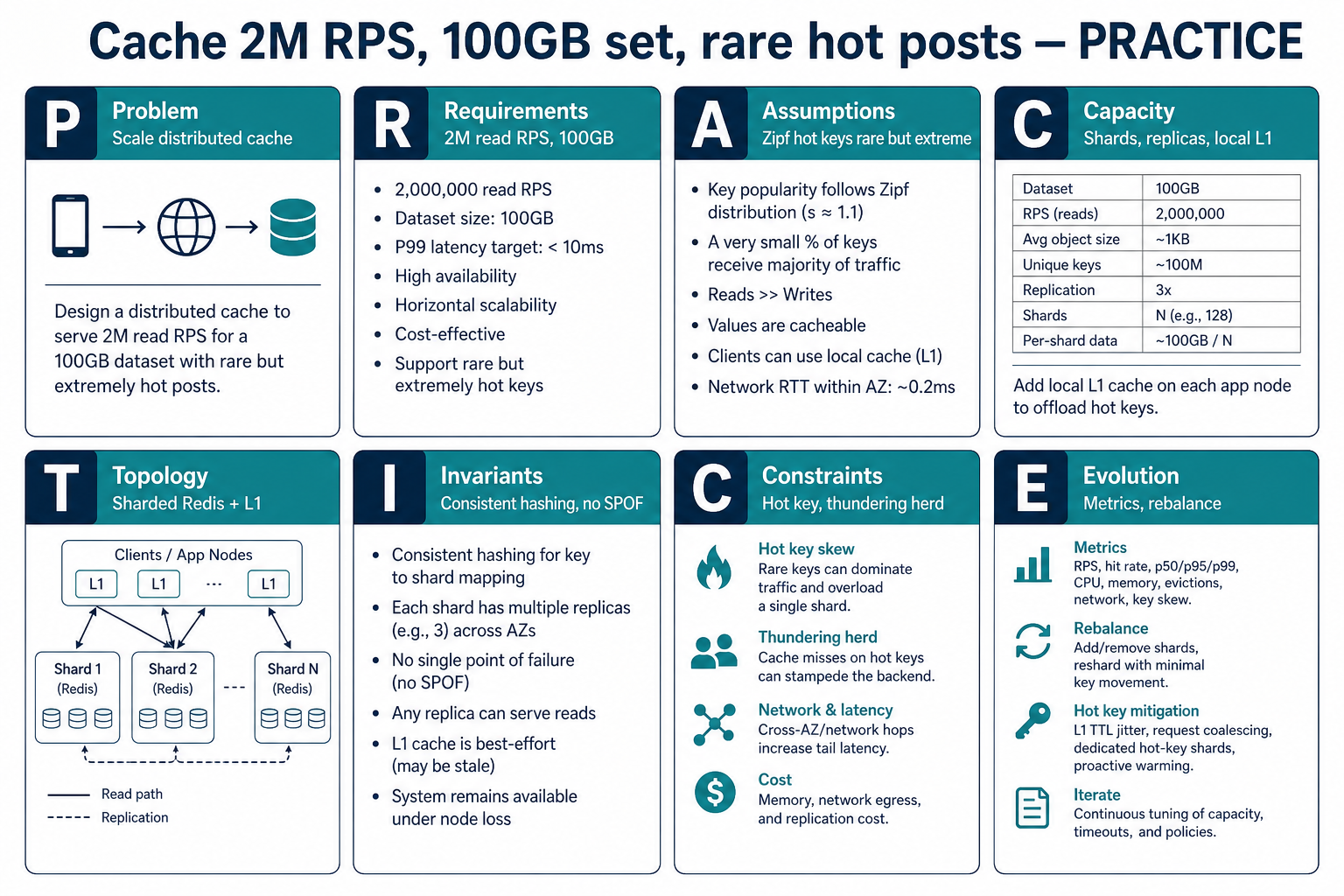
Figure A: PRACTICE map — Problem → Requirements → Assumptions → Capacity → Topology → Invariants → Constraints → Evolution.
Student interview script (PRACTICE)
P — Problem framing
"We need a shared cache that holds about a 100GB working set and serves 2M read RPS, with rare but extreme hot posts—one viral key can melt a single Redis shard because commands for one key hit one primary thread.
Sharding spreads the working set and aggregate QPS, but does not fix a hot key. So the design is two layers: Redis Cluster (L2) for capacity/HA, and in-process near-cache (L1) plus coalescing for hot posts.
Short answer: Redis Cluster sized for ~100GB + headroom with replicas, cache-aside, L1 LRU per app instance for hot posts, single-flight on miss, hot-key monitoring—and load-test a Zipf workload, not uniform."
R — Requirements
| Requirement | Design |
|---|---|
| 100GB working set in memory | Cluster memory ≥ ~150–200GB with overhead + replica copies as needed |
| 2M read RPS | Many shards + L1 absorbing hot traffic; connection pooling / pipelining |
| Rare viral posts | L1 + single-flight; optional replica reads / key fan-out |
| Shared across app fleet | Redis Cluster (not per-pod-only) |
| Survive node loss | Primaries + replicas across AZs; clients handle MOVED/ASK |
| Rebuildable from DB | Ephemeral OK; persistence optional |
"I'd ask: value size? Write RPS? Multi-region? Is stale L1 of 1–2s OK for posts?"
A — Assumptions (state aloud)
| Assumption | Why it matters |
|---|---|
| Zipf reads; rare hot keys | Uniform load tests lie |
| ~1–few KB per post blob | 100GB ≈ tens of millions of keys—plausible |
| Staleness OK for seconds on feeds | Enables L1 + replica reads |
| Same-region apps + cache | Cross-region RTT kills 2M RPS budgets |
| Cache-aside from DB | Miss path must not stampede origin |
"I'd say: a single Redis primary often does ~100k–300k simple GETs in marketing numbers—2M needs horizontal + L1, and we benchmark our payload."
C — Capacity (whiteboard math)
Working set:     100 GB → provision ~150–200 GB cluster RAM (fragmentation, overhead)
Replication:     RF=1 primary + ≥1 replica per shard (memory × replicas for full copies)
Read RPS:        2M — if L1 hits 70–90% of hot traffic, Redis may see hundreds of kRPS split across shards
Per-shard:       size so no shard CPU pegged under Zipf; monitor hot keys
Connections:     pool per app; avoid 2M pods × naive connections → maxclients
Pipelining:      batch GETs where possible
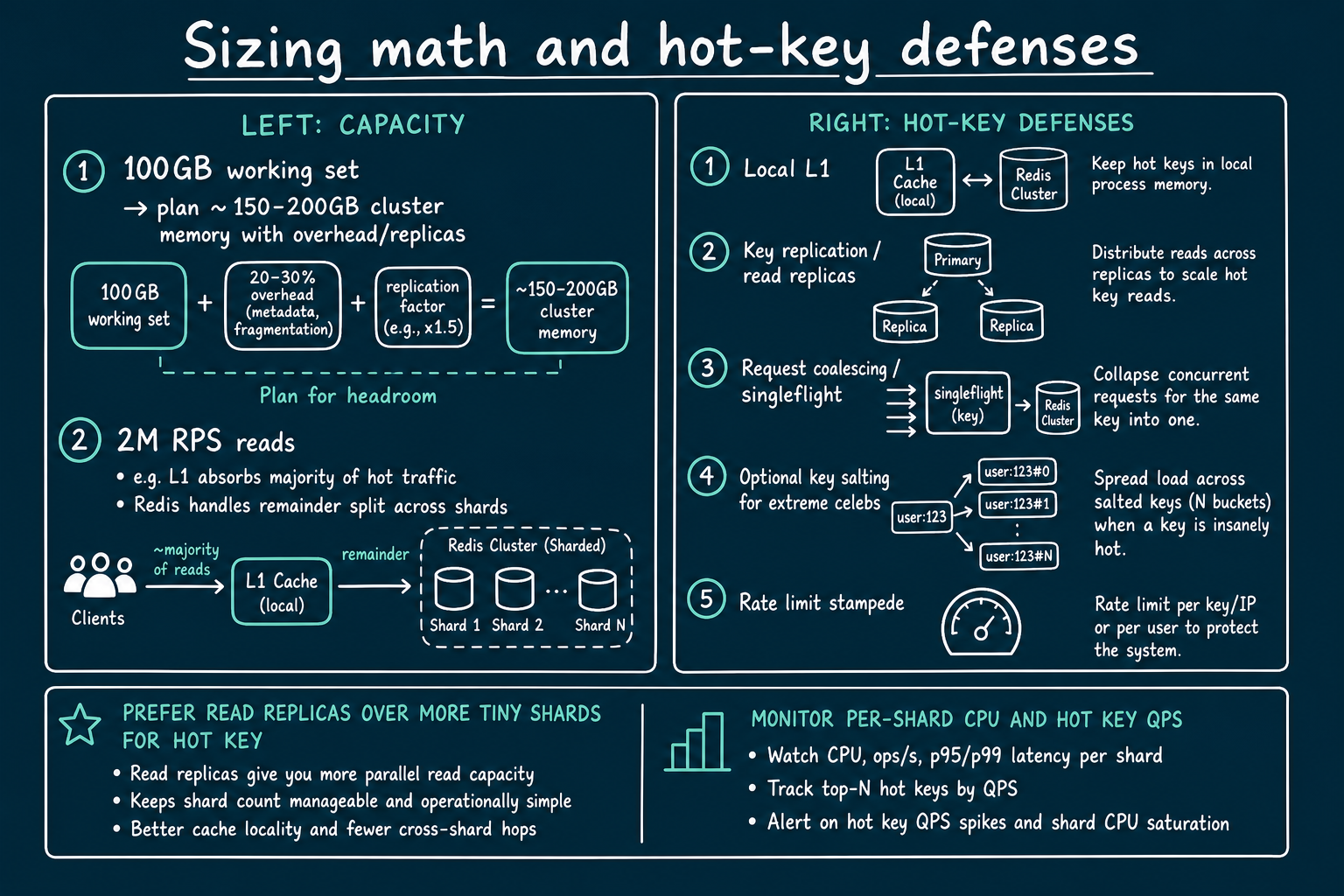
Figure B: Memory headroom for 100GB; L1 + single-flight + replicas defend rare hot posts.
T — Topology (draw this)
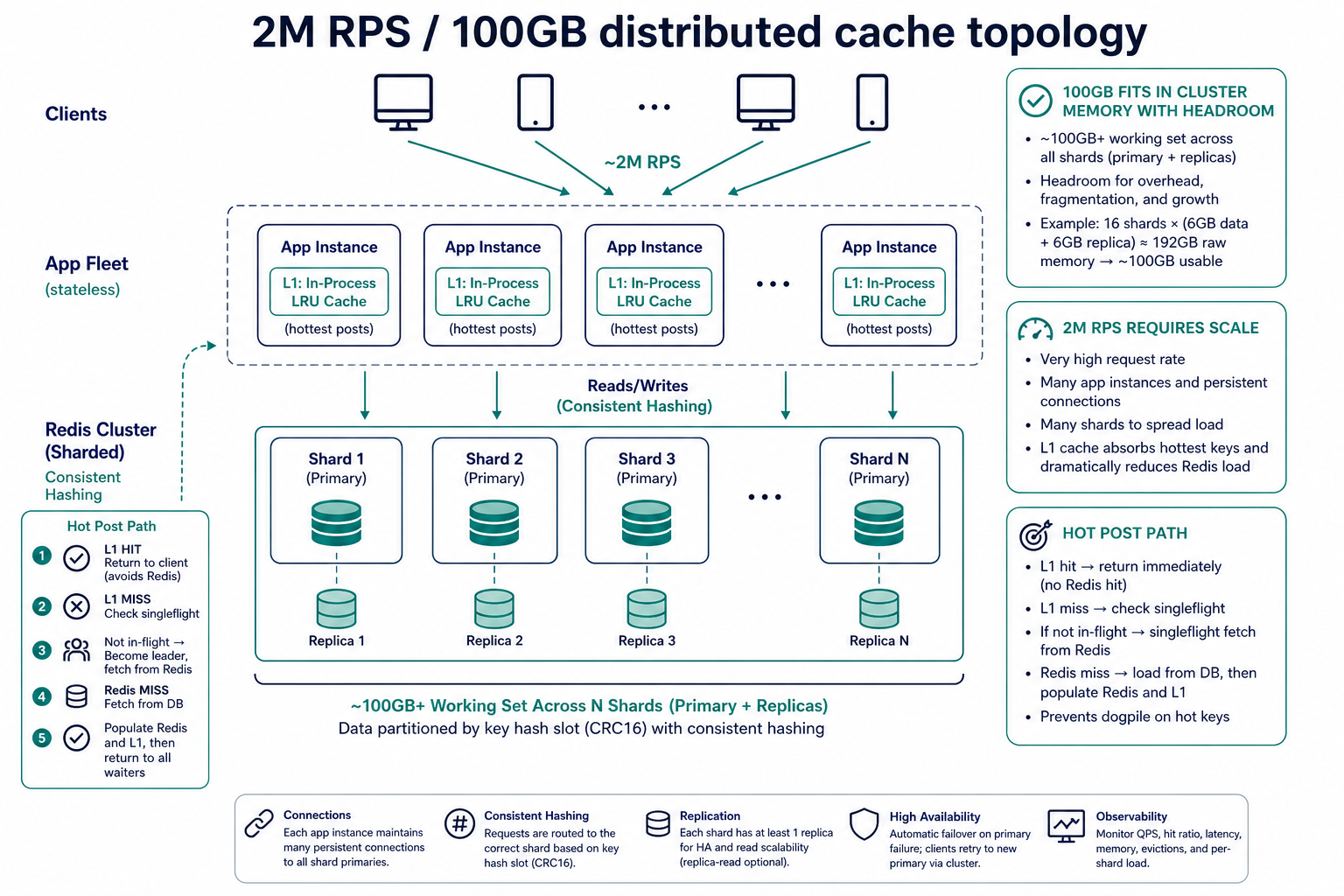
Figure C: App L1 near-cache in front of sharded Redis Cluster; hot posts stop at L1; miss uses single-flight into Redis/DB.
| Piece | Choice |
|---|---|
| L2 | Redis Cluster (16384 slots), multi-AZ primaries+replicas |
| Keying | post:{id}; hash tags {postId}:… if multi-key ops needed |
| L1 | Caffeine/Guava per instance—small hot set, 1–2s TTL, invalidate bus optional |
| Pattern | Cache-aside; TTL + invalidate-on-write for edits |
| Hot key | Detect → pin in L1; coalesce; consider read replicas / salted copies for extreme celebs |
| Clients | Smart cluster client, pools, timeouts, circuit breaker to DB |
Why not "one bigger Redis"? One node can't hold HA + 2M RPS + hot-key isolation. Vertical scale hits the single-thread hot-key wall faster.
I — Invariants (safety)
"Non-negotiable:
- Working set fits with headroom—eviction of hot set destroys the 2M plan.
- Hot key ≠ solved by more shards—need L1 / app techniques.
- L1 coherence: short TTL or invalidate; accept bounded staleness.
- Miss path protected—single-flight / soft TTL so viral post doesn't melt DB.
- No cross-region sync read path for 2M RPS latency.
- Failover/runbooks—CLUSTERDOWN / replica promotion tested."
C — Constraints (second C)
| Constraint | Design response |
|---|---|
| Single-thread per key | L1 + coalescing; don't expect shard count to help one key |
| Big keys (huge JSON) | Split structures; avoid blocking commands |
| Resharding / slot migration | Off-peak; clients retry with backoff |
| Connection storms on deploy | Pooling; maybe proxy; staggered rollouts |
| Multi-tenant noisy neighbor | Separate clusters or quotas; key prefixes |
| Replica lag | Primary for read-your-writes; replicas for feed if SLA allows |
E — Evolution (prove it)
Phased delivery:
| Phase | Deliverable |
|---|---|
| M1 | Size cluster for 100GB+40% ; RF primaries+replicas across AZs |
| M2 | Cache-aside + metrics (hit ratio, per-shard CPU, hot keys) |
| M3 | L1 near-cache + single-flight; Zipf load test to 2M RPS |
| M4 | Hot-key playbook (detect → L1 pin / fan-out) |
| M5 | Chaos: kill primary, cold start, viral key injection |
| M6 | Optional regional clusters for geo; async DR replica |
Failure modes:
| Failure | Mitigation |
|---|---|
| "Bigger instance" | Shard + L1 |
| Hot post melts shard | L1 / single-flight / replica reads |
| Uniform load test passes, prod Zipf fails | Always Zipf/hot-key test |
| Eviction of working set | Memory headroom + maxmemory policy |
| App connect storm | Pools / limits |
Observability: cluster-wide and per-shard ops/sec & CPU, hot-key samples, L1/L2 hit ratio, evictions, connected clients, p99 Redis RTT, DB QPS on miss.
Closing line (interview)
"So for 2M RPS reads, 100GB working set, and rare hot posts: I'd use Redis Cluster sized with memory headroom and replicas, cache-aside, and an L1 near-cache on every app instance so viral posts don't hammer one shard. Single-flight protects the DB on miss. Sharding scales capacity; hot keys need application patterns. I'd prove it with a Zipf load test, hot-key dashboards, and failover runbooks—not a single giant Redis box."
Scoring signals
| Strong | Weak / red flag |
|---|---|
| Shard + L1 + hot-key plan | "Use a bigger Redis" |
| Memory math + headroom | Ignore working-set fit |
| Zipf / viral testing | Uniform-only load test |
| Single-flight / stampede | Miss path melts DB |
| Replicas / AZ / failover | No HA story |
| Per-shard + hot-key metrics | Only cluster-average CPU |
Compact outline (if time-boxed to 2 minutes)
"Redis Cluster for 100GB+ headroom with replicas. L1 near-cache for rare hot posts—sharding won't fix one key. Cache-aside, single-flight, Zipf load test to 2M RPS. Monitor per-shard CPU and hot keys. Circuit-break to DB if cluster unhealthy."
24. Weak Answer Example
Question: "Scale cache for 2M RPS read, 100GB working set, rare hot posts."
"Use a bigger Redis instance."
Why weak / red flags: No sharding, no hot-key/near-cache strategy, no replication/failover, no Zipf sizing—vertical scale fails the viral-post case.
25. Hands-On Exercise
Lab: labs/lab-001-consistent-hashing/ — hash ring on :8096
Concept in simple terms (for students)
Imagine a circle (the hash ring). Every key (like user:42) and every server gets a position on that circle from a hash function.
Rule: To find who owns a key, start at the key’s position and walk clockwise until you hit the first server. That server stores the key.
Why not hash(key) % N?
With modulo (% number of servers), adding or removing a server changes N, so most keys jump to a new server — bad for caches (mass invalidation) and databases (mass data movement).
| Approach | You add 1 server (3 → 4) | What happens to existing keys |
|---|---|---|
Modulo hash % N | N changes | ~75–100% may remap |
| Consistent hashing | New slice on ring | Only ~1/N near the new server move |
Virtual nodes (vnodes) — one server, many spots
A single physical server places multiple points on the ring (e.g. node-b:0, node-b:1, …). That spreads load evenly so one machine does not get one huge arc while another gets a tiny sliver.
Lab 001 implements this ring in Python. Try GET /v1/lookup/user:42 in Swagger — you will see which node owns the key and why.
Real world: Dynamo, Cassandra, Redis Cluster (16,384 slots — a fixed ring variant), and Lab 004 shard routing all use this idea.
cd labs/lab-001-consistent-hashing
python3 -m venv .venv && source .venv/bin/activate
pip install -r requirements.txt
pytest tests/ -v
docker compose -p lab001 -f docker/docker-compose.yml up --build -d
curl http://localhost:8096/health
chmod +x scripts/demo_ring.sh && ./scripts/demo_ring.sh
Swagger: http://localhost:8096/docs · Landing page: http://localhost:8096/
Reset for a clean demo:
docker compose -p lab001 -f docker/docker-compose.yml restart
Step-by-step demo walkthrough (~10 min)
Run each step in Swagger or copy the curls below. Say the explanation aloud while executing — this mirrors a principal-level whiteboard walkthrough.
Step 0 — Confirm the cluster
curl http://localhost:8096/health
Expected (fresh start):
{
  "status": "ok",
  "nodes": ["node-a", "node-b", "node-c"],
  "node_count": 3,
  "total_vnodes": 384,
  "ring_version": 3,
  "lookups_total": 0
}
| Field | What to explain |
|---|---|
nodes | Three physical servers seeded at startup |
total_vnodes | 3 × 128 = 384 ring positions (vnodes spread load) |
ring_version | Increments on every add/remove — clients refresh routing on change |
lookups_total | Demo counter; 0 after restart |
Step 1 — Lookup: who owns a key?
curl http://localhost:8096/v1/lookup/user:42
Expected:
{
  "key": "user:42",
  "hash": 16879443282065980770,
  "node": "node-a",
  "ring_version": 3
}
Explain: hash(key) places the key on the ring. Walk clockwise to the first vnode → that physical node (node-a) owns the key. Same key always maps to the same node (deterministic). Try user:99 — it may land on a different node.
Step 2 — List ring membership (optional)
curl http://localhost:8096/v1/nodes
Explain: Each node was added with 128 vnodes — multiple ring positions per machine for even load distribution.
Step 3 — Scale out: add a server
curl -X POST http://localhost:8096/v1/nodes \
  -H "Content-Type: application/json" \
  -d '{"node_id": "node-d", "vnode_count": 128}'
Expected:
{
  "node_id": "node-d",
  "vnode_count": 128,
  "ring_version": 4,
  "nodes": ["node-a", "node-b", "node-c", "node-d"],
  "total_vnodes": 512
}
Explain: node-d inserts 128 new positions. Only keys in node-d's new arcs move — roughly 1/(N+1) ≈ 25%, not ~100% like modulo. Re-lookup user:42 — owner changes only if node-d stole that arc.
Step 4 — Load balance: do vnodes work?
curl -X POST http://localhost:8096/v1/simulate/balance \
  -H "Content-Type: application/json" \
  -d '{"key_count": 100000}'
Expected (representative run):
{
  "key_count": 100000,
  "nodes": 4,
  "distribution": {
    "node-a": 25687,
    "node-b": 25576,
    "node-c": 23949,
    "node-d": 24788
  },
  "coefficient_of_variation": 0.028
}
| Metric | What to explain |
|---|---|
distribution | How 100k synthetic keys spread across nodes |
coefficient_of_variation | Lower = more even. < 0.05 is good with 128 vnodes |
Explain: Vnodes fix uneven slice sizes, not hot keys — one viral key still hits one node.
Step 5 — Churn: consistent vs modulo (money shot)
curl -X POST http://localhost:8096/v1/simulate/churn \
  -H "Content-Type: application/json" \
  -d '{"key_count": 5000}'
Expected (representative run):
{
  "keys": 5000,
  "nodes_before": 4,
  "nodes_after": 5,
  "consistent_hashing_churn": 0.4492,
  "modulo_hashing_churn": 0.7996,
  "consistent_wins": true
}
| Field | What to explain |
|---|---|
consistent_hashing_churn | Fraction of keys that change owner when a node is added |
modulo_hashing_churn | Same scenario with hash % N — denominator changes, most keys remap |
consistent_wins | Consistent hashing moved fewer keys |
Interview line: "Modulo is O(1) but catastrophic on membership change. Consistent hashing trades a bit of complexity for minimal key churn on scale-out."
Step 6 — Node failure: how many keys move?
curl -X POST http://localhost:8096/v1/simulate/node-failure \
  -H "Content-Type: application/json" \
  -d '{"node_id": "node-b", "key_count": 10000}'
Expected (representative run):
{
  "failed_node": "node-b",
  "keys_sampled": 10000,
  "keys_redistributed": 2538,
  "redistribution_ratio": 0.2538,
  "expected_approx": 0.25
}
Explain: Remove node-b. Keys that were on node-b move to the clockwise successor. redistribution_ratio ≈ 1/N (~25% with 4 nodes). Only the failed slice moves — not the whole keyspace. Production also needs replication (Lab 004).
Step 7 — Clean up (optional)
curl -X DELETE http://localhost:8096/v1/nodes/node-d
Removes node-d and bumps ring_version again.
Demo flow summary
| Step | Endpoint | What happens |
|---|---|---|
| 0 | GET /health | 3 nodes, 384 vnodes, fresh counters |
| 1 | GET /v1/lookup/user:42 | Key → hash → clockwise → owning node |
| 2 | GET /v1/nodes | List ring membership |
| 3 | POST /v1/nodes | Add node-d with 128 vnodes |
| 4 | POST /v1/simulate/balance | Load distribution (CV across nodes) |
| 5 | POST /v1/simulate/churn | Consistent vs modulo churn comparison |
| 6 | POST /v1/simulate/node-failure | ~1/N keys redistributed on remove |
| 7 | DELETE /v1/nodes/{id} | Optional cleanup |
5-minute interview recap
| Topic | One-liner |
|---|---|
| Lookup | Hash key → walk ring clockwise → first vnode wins |
| Vnodes | Multiple ring positions per server → even load |
| Scale-out | ~1/N keys move (not ~100% like modulo) |
| Hot keys | Not fixed by consistent hashing — need salting, near-cache, or replication |
| Failure | Failed node's arc moves to clockwise neighbor |
| Production | Dynamo, Cassandra, Redis Cluster slots; Lab 004 uses simpler hash % 3 stand-in |
Engineer guide: how the local stack works
- Hash ring (
src/ring.py) — SHA-256 positions; sorted ring with bisect lookup. - Virtual nodes — each physical node adds
vnode_countpositions (node_id:0..N). - Lookup —
hash(key)→ clockwise successor on ring (wraps at end). - Churn — adding a node moves only keys in the new node's arc (~1/N).
- Balance — more vnodes → tighter load distribution (diminishing returns past ~128).
Used by labs/lab-004-replicated-kv-store/ for shard routing (hash(key) % 3 stand-in).
Build-from-scratch exercise (optional)
- Deploy 3-node Redis Cluster locally; observe slot distribution.
- Create hot key; measure single-node CPU.
- Add local near-cache layer; compare.
- Demonstrate CROSSSLOT without hash tags; fix with tags.
26. Knowledge Check
- Redis Cluster slot count? (16384.)
- Hot key limit? (Single shard thread.)
- Hash tag syntax? (
{tag}in key.) - Replica read risk? (Stale data.)
- Near-cache purpose? (Reduce hot key network load.)
27. Flashcards
| # | Front | Back |
|---|---|---|
| 1 | Hash slot | Key-to-shard mapping unit. |
| 2 | Hot key | Disproportionate QPS key. |
| 3 | Near-cache | Local L1 before Redis L2. |
| 4 | Hash tag | Co-locate keys in slot. |
| 5 | MOVED redirect | Slot migrated to other node. |
| 6 | CROSSSLOT | Multi-key wrong slots error. |
| 7 | volatile-lru | Evict TTL keys LRU style. |
| 8 | Sentinel | HA for non-cluster Redis. |
| 9 | UNLINK | Async non-blocking delete. |
| 10 | Zipf workload | Realistic hot key distribution. |
28. Cheat Sheet
REDIS CLUSTER
  16384 hash slots → primaries
  CRC16(key) mod 16384
  Hash tag: {user}:cart + {user}:profile

HOT KEY
  Near-cache (local L1)
  Read replicas (staleness OK?)
  Key split / CDN

OPS
  maxmemory + eviction policy
  Avoid KEYS *, big keys
  Pipeline/batch
  Same-AZ placement

FAILURE
  Replica promotion
  Client retry + backoff
  Cold start warmup

MULTI-KEY
  Same slot required
  Use hash tags
29. Related Concepts
- Caching Fundamentals — cache-aside and tiers
- Cache Invalidation — cross-node coherence
- Quorum Systems — replication reasoning
- CAP Theorem — partition behavior
- Primary-Secondary Replication — Redis primary/replica model
30. References
Primary sources
- Redis Documentation — Cluster specification, Replication.
- Apache Kafka not applicable—see Redis cluster tutorial.
Engineering
- Amazon ElastiCache — Best practices for Redis.
- Antirez (Salvatore Sanfilippo) — Redis cluster design posts.
- Twitter engineering — Pelikan cache separation (verify current status).
Distinction
| Claim type | Source |
|---|---|
| Slot algorithm, failover | Redis cluster spec |
| Throughput numbers | Workload-dependent—benchmark |
| Hot key patterns | Engineering practice; Redis docs |